| Ira Goldklang's TRS-80 Revived Pages |
| Ira's TRS-80 Model 100 Page |
| This page deals with the TRS-80 Model 100 | |
| Facts About The Model 100 | |
| Background | |
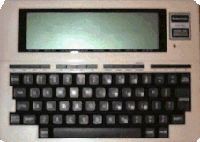
| The Model 100 was created by Kyocera in Japan, and marketed by Radio Shack in the United States. It was introduced in 1983 at a price of about $799. It was followed by the Model 102, and the Model 200. | |
| Specifications | |
|
|
|
| Model 100 Emulator - Virtual Vinessa |
| Want to make your Model 100 Year 2000 compatible (somewhat)? Go to This Site |
| Transferring ASCII (only) Files from an IBM to a Model 100 | |
| 1. | Connect the RS-232 Port on the Model 100 to the Serial Port of the IBM |
| 2. | Set the PC terminal program to 19,200 BPS, 8-Bit, No Parity, XON/XOFF Enabled |
| 3. | Ensure that the PC terminal program does NOT add linefeeds |
| X. | Save the file you want as an ASCII file (we will assume it is FILE.TXT) |
| X. | Export the ASCII file to the PC |
| X. | On your PC - Open a DOS Shell or use DOS and type: MODE COM1: 300 |
| X. | X |
| 4. | Go into BASIC on the Model 100 |
| 5. | Type "LOAD:COM:98n1e" (without the quotes) |
| 6. | Hit (ENTER) |
| 7. | On your PC - type, COPY FILE.TXT COM1: |
| 8. | When done hit (CONTROL)-Z on the Model 100 |
| 9. | If the program transferred fine, SAVE it. |
OR
| Transferring Files from an IBM to a Model 100 [By Richard Hanson - Proprietor of Club 100] | |
| 1. | Download DL-ARC to C:\ROOT on your PC |
| 2. | Execute the DL-ARC program (which is a self-expanding archive) |
| 3. | Follow the instructions for DeskLink and TEENY (contained in the archive) |
| INSTALLING A .CO FILE by Richard Hanson |
| The .CO file extension in a Model 100, 102, 200 means that the file is programmed in machine language. Just because you "see" the .CO file in your menu does not mean it is where it has to be to run. In fact, it's easy to know if a .CO is installed as it will beep and return you to the menu if it is not. It's that simple! |
| Machine language programs can not run in a Model 100, 102, 200 without being "copied" to a special place in RAM. And yes, once copied to that special place in RAM the .CO files also reside in yet, another place in RAM so they will appear in your menu, i.e. a installed .CO file that is also seen in the menu is in RAM in two places. This is not necessarly bad -- just the way it works in these machines. |
| To copy the .CO file to that special place in RAM so it will run, you need to do the following steps. |
| Note: In this example the word "filename" refers to the name of the .CO file, and ##### refers to the "Top:" number you need to find and use to install the .CO file. |
| Go into BASIC and issue the commands: |
     clear0,maxram
     loadm"filename.co
|
| You will get three numbers labeled "Top:", "End:" and "Exe:" followed by an error code -- ignore the error. Write down the "Top:" number. |
| While still in BASIC, issue the commands: |
     clear256,#####
     loadm"filename.co
     menu
|
| You have just installed the .CO file. Now, when you place your bar cursor
over the file and hit |
| Model 100 Casette Port Pin-Outs | |
| Casette | |
| 1 2 3 4 5 6 7 8 |
Remote 1 Ground Remote 2 RxC Receive data for CMT TxC Receive data for CMT Ground Not Connected Not Connected |
| Modem Interface | 1 2 3 4 5 6 7 8 |
TL conventional telephone unit Ground RxMD Direct connect to tel (Ring) RxMC Acoustic coupler (MIC) TxMC Acoustic coupler (Speaker) Vdd TxMD Direct connect to tel (TIP) RP Ring Pulse (sic) |
| Model 100 Y2K Patch | |
Model 100 Year 2000 Menu Display Patch
Chris Osburn - chris@muppetlabs.com
WARNING! This patch has been tested on one and only one Model 100, i.e. the one
on my desk. It has 32k of RAM. This has not been tested on machines having less
RAM, nor has it been tested on the Model 102 or 200. I've noticed side effects
on my machine when running machine-language programs. Usually these side
effects resulted in locking the machine up or cold restarts causing memory
loss. Make a backup! I haven't tested for effects on the built in apps as yet.
BASIC should pose no problem as the program reserves for itself a small amount
of high memory. You Have Been Warned. Caveat Utilitor. Your Mileage May Vary.

Bug and side effect reports are welcome, but I doubt I'll be able to do much
about them. This patch is no way as good a solution as patching and burning a
new ROM. (By the way, if you can patch the ROM, set addr 5A53h = 32h and addr
5A56 = 30h and away you go!)


Background
The TRS-80 Model 100 was created in a joint venture between Kyocera (for the
hardware) and Microsoft (for the software). The Model 100 has an attractive
main menu display, which displays the date in the form "Jun 20,1998 Sat
13:15:36".
The Model 100's real-time clock chip is a uPD 1990AC which stores a BCD
represntation of month, day of week, day of month, hours, minutes and seconds.
It also produces a pulse that drives a background process interrupt.
Conspicuously absent is the year. The Model 100 works around this by storing
the 2-digit year as 2 BCD digits in locations F92Dh and F92Eh and updating
these by comparing the month reported by the 1990AC with a copy stored in addr
F655h. The day-of-week is maintained in a separate register in the 1990AC, and
not calculated. If you decide today is Sunday, the chip will happily believe
you and tell you tomorrow is Monday, regardless of the actual day and date.
This makes our task considerably easier.

Nowhere in the internal workings of the Model 100 is the century stored or
used. BASIC programs may therefore have year 2000 issues beyond the scope of
this document. However, as noted above, the century is displayed on the main
menu.

At addr 5A15h is the routine that grabs the real time clock data and formats it
for menu screen output. Notable in this routine are these instructions:


 5A4Fh:	MVI  M,2Ch  ; store a comma
        INX  H      ; increment memory pointer
        MVI  M,31h  ; store the digit '1'
        INX  H      ; increment memory pointer
        MVI  M,39h  ; store the digit '9'

(As noted above, if you can patch the 31h and 39h to read 32h and 30h, your
work here is done. Feel free to let me know if you have this capability; i'd be
happy to do business with you!)
The 5A15h routine uses a scratch pad starting at FD88h to build the output
string, and the "19" gets dropped into the two bytes FD8Fh and FD90h. If one
had a way of changing these values before the instruction that copies them to
the LCD display is called, surely we'd be in Nirvana. But the LCD update is
called just a few instructions later.


Method
Enter the background process, mentioned above. 256 times per second the real
time clock prods the RST 7.5 interrupt line on the 8085 processor, causing the
routine at 003Ch to be executed. Eventually, this takes us to F5FFh where we
find three bytes encoded

 F5FFh: RET
        NOP
        NOP

Three bytes is just the right amount for a JMP instruction to take us to the
code of our choice, just as the designers intended. (They did intend that,
right?)

Following is a BASIC program that reserves 16 bytes of memory for our update
routine, pokes in the relevant processor instructions, then (very carefully)
enables the patch by changing the bytes at F5FFh.


 1 ' TRS-80 Model 100 Year 2000 Menu
 2 ' patch.  Run to get "20" to appear
 3 ' as the century.  run 1000 to
 4 ' restore default functionality
 5 ' Side effects:  Many!  run 1000
 6 ' before questionable activity!
 10 ' allocate our memory by setting
 11 ' HIMEM
 20 CLEAR 256,62943
 30 ' read the instructions from data
 31 ' to memory
 40 FOR A=62944 TO 62956
 50 READ B
 60 POKE A,B
 70 NEXT A
 80 ' Enable the patch.  We want to
 81 ' have JMP 0F5E0H encoded here.
 82 ' But, if we put the JMP instruction
 83 ' in first, the machine will just
 84 ' keep jumping to 0000h 256 times
 85 ' per second.  So, we do this in
 86 ' reverse!
 100 POKE 62977,245 ' hi addr
 110 POKE 62976,224 ' lo addr
 120 POKE 62975,195 ' and JMP!
 190 ' The preassembled assembly
 191 ' program that gets called
 200 '                  ORG    0F5E0H
 210 DATA 229 '  Y2K:   PUSH   H
 220 DATA 245 '         PUSH   PSW
 230 DATA 33,143,253 '  LXI    H,0FD8FH
 240 DATA 54,50 '       MVI    M,32H
 250 DATA 35 '          INX    H
 260 DATA 54,48 '       MVI    M,30H
 270 DATA 241 '         POP    PSW
 280 DATA 225 '         POP    H
 290 DATA 201 '         RET
 999 END '              END    Y2K
 1000 ' Code to disable the patch
 1001 ' if needed
 1010 POKE 62975,201 '  RET

The code pushes registers that may be affected, then goes to store the "20" in
the right place. It's certainly overkill to do this 256 times per second, and
will likely have a performance impact. Unfortunately, there's no hook provided
in the date string builder routine. The POKE at line 1010 restores the original
RET instruction, disabling the patch.

Side Effects
The program uses the uppermost 16 bytes of free user memory (starting at MAXRAM
- 16) to store the patch. Any machine language program that will use that area
will need to have the patch disabled by restoring the RET instruction to F5FFh.

I haven't determined whether the scratch pad at FD88h is used by any builtin
programs. Obviously, the menu doesn't need it during at those times, and it
appears that it isn't updated. A way of determining when one is in the menu
program is desirable.

I'm uncertain whether MAXRAM - 16 will be a suitable location for all users to
store the patch. I need to rewrite the code to make that a settable variable.
(Not hard, just haven't gotten there yet.)

Conclusion
I would rather the designers left off the century entirely than hard-code it to
"19". This program should be considered a stopgap until a ROM upgrade facility
is available. Perhaps one could get the Department of Justice to cause
Microsoft to pick up the tab for this...
References
Morgan, Christopher L., Hidden Powers of the TRS-80 Model 100, The Waite Group,
New York, 1984
Tandy Corporation, TRS-80 Model 100 Assembler / Debugger Manual, catalog number
26-3823, Tandy Corporation, Fort Worth, Texas, 1984
Tandy Corporation, TRS-80 Model 100 Owner's Manual, Tandy Corporation, Fort
Worth, Texas, 1983
| |
| Model 100 Related Links | |
|
|
|